How to Approach a Programming Assignment | Student Guide
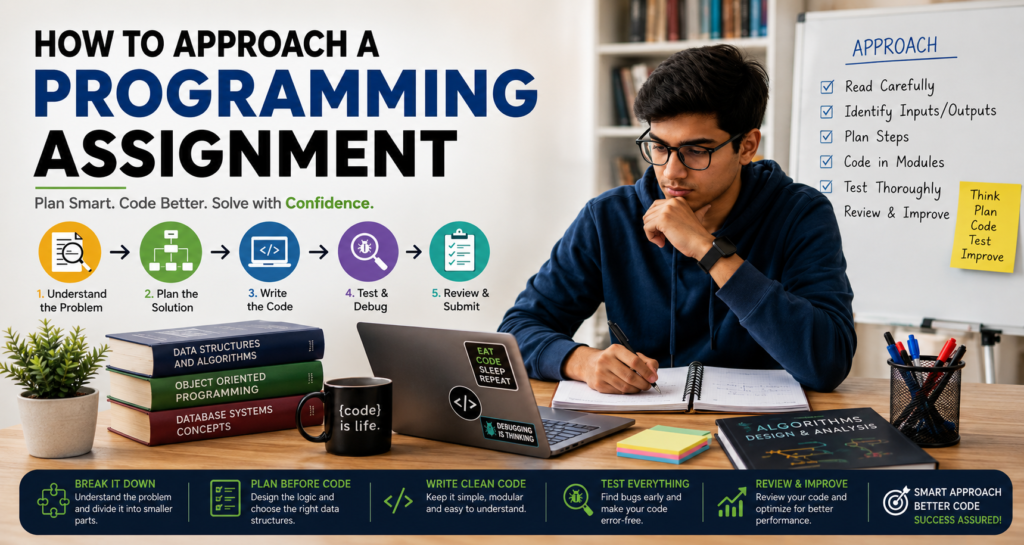
A programming assignment can be much more intimidating than it seems to be.
When you open the program and read the prompt for the assignment, a flood of text inundates you with terminology that you may not understand. Furthermore, when you open your code editor of choice, you are faced with a blank screen and cursor that seems to mock you at this moment for having no idea what to type in your editor to complete the assignment.
All of this is normal when you are just beginning to build your foundation in computer science.
The most common trap that students fall into is that of too quickly starting to code. Many will skim the brief once to get an idea of the task, but then jump right into their code. When errors begin to appear, they tend to randomly begin changing code to fix the errors without understanding the reason for their emergence in the first place.
The better strategy is to slow down initially when faced with any project, regardless of the language (Java, C++, SQL, etc.) or task (projects, coursework, queries, tasks). Each project follows the same general framework for success.
Step 1: Start With the Assignment Brief, Not the Code Editor
Read the brief from start to finish. Read it once to get an overview of the task, then read it a second time to highlight the important elements.
Consider the following typical assignment guide brief:
Write a program that takes exam marks for five subjects, calculates the average mark for the student, and displays the overall grade that the student received.
A beginner coder might begin to write statements to take input from the user immediately. But before you start to write code, write down the operational requirements of the program:
- What are the boundaries for each grade?
- What should be done with out-of-bounds numbers?
- Are there any requirements with the code?
- Is there a specific way that the code should be documented?
Even if a program compiles and returns 0 errors, it can still fail the requirements if it does not follow the instructions in the assignment.
Step 2: Breaking the Problem into Four Basic Modules
A great way to approach a problem is to break it down into four basic components:
- Input (Data Acquisition): Get five numeric scores from the user or file.
- Processing (Computation): Calculate the average of the five scores.
- Rules (Business Logic): Determine the letter grade associated with the average score.
- Output (Presentation): Print the average and its associated grade.
Applying This Framework Across Different Domains
- Database management (SQL) systems take the input of a search query from a user, process that query to retrieve records based on foreign keys, and rule-based logic determines which records satisfy the query and are output on the screen.
- In the world of e-commerce, the system takes the item that the user wants to purchase and the quantity of those items as an input. Processing that input calculates the user’s order subtotal. Additionally, rules determine the discounts for purchases of specific quantities of items and output the total order amount with any applicable discount tiers.
Step 3: Identify Key Imperative Keywords
Another way to determine the type of programming constructs that will be required for your programs is to analyze the actual programming brief itself. Look for the keywords that indicate which types of programming constructs will be necessary:
- Keywords like “calculate” or “compute” indicate that you will need to use your program to perform mathematical operations and define variables.
- Keywords like “display” or “render” indicate that you will need to use your program to define statements that will output information from your program or to define GUI components of your program.
- Keywords like “store” or “collect” indicate that you will need to use data structures within your program.
- Keywords like “sort” or “search” indicate that you will need to use algorithms within your program or objects like built-in search utilities.
- Keywords like “validate” indicate that you will need to use conditional statements (like if/else statements) within your program.
- Keywords like “repeat” or “for each” indicate that you will need to use loops within your program.
For instance, a programming brief of “read 10 numbers and find the maximum value” indicates that the program will need to incorporate components that read from the user, a data structure (or loop) to store the 10 numbers, and a conditional statement to determine which number is the maximum of the group of 10 numbers.
Step 4: Check Language and Department Restrictions
Check the constraints of the environment you are working in before deciding on your implementation.
Your instructor may place specific restrictions on the types of implementations you may use. For instance, your instructor may say:
“Implement the array sorting routine. Do not use the libraries for sorting that are included with the system.”
Using a library like Arrays.sort() in Java or std::sort in C++ will result in the correct output for your program, but you will be deducted points for using it.
Ensure that your instructor does not require you to use specific implementations, such as:
- Using a linked list instead of a dynamic array
- Explicit recursion instead of iterative loops
- Object-Oriented design patterns like classes and interfaces
- Specific database schemas or query formats
Step 5: Break Large Projects Into Sequential Milestones
Trying to build a complex project with multiple features at once will only result in developers getting frustrated trying to debug their projects. Instead, break the project into multiple modules that contain the necessary functions to accomplish the project’s goal, and build each of those modules one at a time.
Consider a project that creates a system with six main features: adding a student, displaying all students, searching for students, updating students, deleting students, and exporting student data.
Incremental Development Steps
- Construct the data container and determine how to add data to it.
- Build the display logic to print that record to the console.
- Add the search capability to retrieve a specific record.
- Implement update and delete routines.
By isolating features, you can immediately see which newly added module is causing the error messages during runtime.
Step 6: Write Language-Agnostic Pseudocode
Pseudocode allows you to write your algorithms without having to worry about syntax and the specific language you will eventually code in.
Here is an example of language-agnostic pseudocode for finding the largest number in a list:
Plaintext
SET max_value = first element in list
FOR EACH number IN list
IF number > max_value THEN
SET max_value = number
END IF
END FOR
PRINT max_value
END FindMaximum
You can see how the Java, C++, C#, and JavaScript languages could easily be used to implement this algorithm. Solving the logic of the problem first makes for an easier translation into the target languages.
Step 7: Write a Minimal Viable Version First
The very first step in translating your pseudocode into actual code is to write the minimal viable version of that code first. For instance, if you are trying to write a C++ program that calculates averages, the very first line of code that should be written is:
C++
#include <iostream>
#include <vector>
#include <numeric>
int main() {
// Phase 1: Hardcoded proof of concept
std::vector<double> scores{70.0, 80.0, 90.0};
double sum{0.0};
for (double score : scores) {
sum += score;
}
double average{sum / scores.size()};
std::cout << “Average: ” << average << std::endl;
return 0;
}
Iterative Layering
- Replace the hardcoded values with dynamic user input.
- Encapsulate the calculation logic in dedicated functions.
- Add input validation to ensure that only valid data is accepted from the user.
Step 8: Learn to Read Compiler Errors and Trace Bugs
The debugger and the console error messages are tools that will assist you in troubleshooting your programs. When your program encounters an error, take a moment to read the error message and identify three things about the error: its class, the file name that threw the error and the line number in that file, and in what context the execution of the program failed at that point in time.
Common Exception Classes
- Syntax Errors: Caused by the compiler’s inability to parse the structure of your code.
- Type Errors: Caused by attempting to perform an operation between incompatible types of data.
- Boundary Errors: Caused by attempting to access memory or array indexes outside the allocated memory or array.
- Logical Errors: Caused by the program executing without errors but producing incorrect results.
Beyond testing your code with the example provided in the assignment brief, test it with various cases that the instructor may use to automatically test your code.
Step 9: The Three-Tier Testing Strategy
Test your programs using these three types of test data:
- Standard Inputs: Use normal, expected data values for your tests, such as test scores of 75, 82, and 90.
- Boundary or Edge Inputs: Use data values that test the boundaries of your programs, such as test scores of 0, 100, or whatever the maximum allowable integer value is.
- Invalid Inputs: Try to enter values that fall outside the expected range for your programs, such as negative numbers for a test score or text instead of a number.
Step 10: Prioritize Readability, Formatting, and Style
Remember that your code must be readable by humans, not just machines.
Key Readable Code Practices
- Use descriptive names for your variables instead of obscure names like x, y, or total. For instance, use studentTotalScore instead of x.
- Consistent Indentation: All code elements should be indented uniformly.
- Targeted Comments: Only comment about the reasons for difficult decisions within the code.
Java
// Avoid:
// Add 1 to i
i = i + 1;
// Recommended:
// Increment the attempt variable to enforce the maximum number of login attempts
loginAttempts++;
Step 11: Use Version Control for Multi-File Projects
For projects that contain more than one file, manually creating copies of the project files becomes challenging. Using version control software, such as Git, will allow you to save your project checkpoints.
Bash
git commit -m “Implement core database connection routine”
git commit -m “Add error handling for invalid user inputs”
git commit -m “Resolve array indexing bug in search module”
If your new change breaks your codebase, Git allows you to roll back to a previous known good state.
Step 12: Work with AI Tools and External Guidance Responsibly
Artificial intelligence tools and online learning forums can be helpful learning tools when used appropriately:
Proper vs. Risky AI Tool Usage
- Good uses for AI tools may include asking for explanations of cryptic error logs or algorithmic concepts for your programming assignments.
- Risky uses of AI tools may include pasting code from AI into your programming assignment.
Submitting code that you cannot explain poses a significant risk to your academic integrity. Should the instructor ask you to explain your code during the viva or while completing the practical, presenting no explanation of your code will result in severe penalties for academic integrity.
If you cannot explain why a specific line of code is within your script, how it works, and what will happen if it is removed, spend more time reviewing the logic behind your code before you submit it.
Framework Summary: Steps to Approach Your Next Assignment
- Analyze the Brief: Read the question carefully and determine the different elements of the question and the constraints regarding its submission.
- Design the Logic: Map out the logic of your program using pseudocode before you begin to write your code.
- Build a Baseline Version: Write a baseline version of your application that includes only the essential elements required to compile and execute your code.
- Layer in Features and Test: Add the remaining features to your application and test your code with a variety of test cases to ensure it handles both standard, edge, and invalid inputs.
- Refine and Clean: Improve the readability of your code by adjusting your variable names, indentation, and comments.
- Run Final Verification: One last time, review your code to ensure it meets the requirements of the instructor’s rubric and file requirements.
Pre-Submission Verification Checklist
Before you submit your deliverables for this programming assignment, ensure that you have completed the following checklist:
Logic and Execution
- [ ] Has the program compiled and executed without any exceptions?
- [ ] Have you tested the program with various types of input?
- [ ] Has the program fulfilled all the requirements regarding the rubric?
Code Quality
- [ ] Are the variable and function names descriptive?
- [ ] Is the code properly indented?
- [ ] Are the comments regarding the more complex sections of the code?
- [ ] Have you removed any unused variables and functions?
Deliverables
- [ ] Have you submitted all the required files in the proper format?
- [ ] Have you included all the required documentation and files?
- [ ] Are the files named correctly?
Frequently Asked Questions
How do I get started when I feel completely stuck on a problem?
Work out the problem on paper using simple numbers. Writing out the steps you took to solve it manually will translate easily into pseudocode.
What should I do if my code works for the assignment sample but fails other test cases?
Look at what assumptions you are making in your code that may not apply to all test cases. Create test cases that may be thrown at your application to ensure your code can handle them.
Is it acceptable to use external libraries if they make the problem easier?
Only if the assignment brief explicitly permits them. Using libraries defeats the purpose of learning data structures and algorithms.
Final Thoughts
Complex programming assignments may seem intimidating when one considers the problem and the looming deadline.
However, it is important to refrain from considering such problems as one massive hurdle to overcome. Instead, consider the problem’s components individually and create solutions for each of those components in the code project.
Programming requires a certain level of iteration to develop an understanding of the process. By shifting the focus away from the syntax required for the code project and instead focusing upon the problem to be solved by the project, one can find the appropriate solution to even the most challenging of programming assignments.
